AllTracker 11.2 - Health, Content Filter & Smart Notifications

AllTracker 11.2
Major Update:
Health + Content Filter + Smart Notifications
AllTracker 11.2 brings three brand new features along with meaningful improvements to existing ones. More visibility, smarter alerts, and better control over the data you collect.
New Feature: Health

You can now monitor health data collected by the target device's fitness sensors. Three types of data are now available in the Health section:
- Heart Rate History - view logged heart rate measurements over time.
- Daily Steps History - track daily step counts recorded by the device.
- Sleep Data History - see sleep tracking data including duration and patterns.
Free for all users!
Data availability depends on the sensors and health apps present on the monitored device.
New Feature: Content Filter
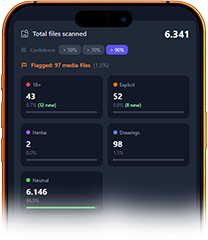
AllTracker can now automatically scan media files on the monitored device for adult (18+) content categories. When inappropriate content is detected, a notification is instantly sent to your Control Center app. The entire classification runs locally on the target device using an on-device AI model - no image data ever leaves the device.
- Automatic scanning of all media for 18+ categories
- Instant notification to the Control Center when content is found
Included at no extra cost for ULTIMATE subscribers!
New Feature: Control Center Notifications
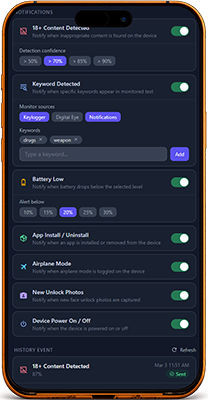
Your Control Center app can now send you push notifications for important events on the monitored device. Stay informed without checking the app manually.
You can be notified when:
- New 18+ media is detected
- A keyword is found in keylogger, screenshots, or notifications
- The battery drops below your set threshold
- An app is installed, updated, or uninstalled
- Airplane mode is enabled or disabled
- New unlock photos are uploaded
- The device reboots
Each notification costs 1 credit. Every plan includes 1,000 free credits per month. When credits run out, notifications pause until the next monthly reset - no extra charges.
Auto Screenshot Improvements
The Auto Screenshot feature introduced in 11.1 now has better tools for reviewing captured screenshots:
- Sort by date - browse screenshots in chronological order
- Filter by unseen only - quickly review only what you have not seen yet
- Filter by keywords - search screenshot content for specific words
Also in this update:
- Selective deletion of collected data
- Various bug fixes and performance improvements
Try the DEMO of the new features right now
Update AllTracker X to the latest version to enjoy all new features and improvements. We strive to provide you with the best monitoring tools tailored to your needs.
© AllTracker 2014-2026, All rights reserved alltracker.org alltracker.de alltracker.su alltracker-family.com alltracker-business.com
Warning icon